
Every week I read my favorite SEO newsletters: Search Engine Journal, SEOFOMO, Marie Haynes, Freddie Chatt, Mark Williams-Cook from Core Updates and Think with Google. Google’s own announcements are in the mix too. Here are 8 things from last week worth your attention if your business depends on search traffic.
The big one: if your site runs on WordPress, or anything built on PHP, it needs a security patch, and how your host handles the downtime matters for your rankings.
1. Your site probably needs a PHP security patch
What happened: Critical security flaws were found in PHP, the code most websites use, including every WordPress site. You never see it, but your site can’t load without it. Emergency fixes went out Oct 21 (NCSC, Search Engine Journal). Google followed up with a reminder: if you take a site offline to patch it, serve a 503 status from outside PHP and keep robots.txt reachable (Search Engine Journal).
What it means for you: An unpatched site can be taken over by attackers without anyone logging in. The patch itself can cause problems too: a 503 tells Google “back soon,” but a broken page or several days of server errors can get pages dropped from search results. You’ll see its effects: white screens or “critical error” messages, forms or checkout that stop working after a host update, or a jump in “Server error (5xx)” pages in Google Search Console.
What to do: You don’t need to know what version you’re on. Send your developer, agency or host three questions today: What PHP version are we on, and is it still supported? Have the October PHP security patches been applied? If the site goes down to patch, will it show visitors and Google a maintenance page (a 503)? If the answer to the first question is 8.1 or lower, or nobody knows, ask for an upgrade plan.
On WordPress you can also check yourself: go to Tools, then Site Health, and it will flag an outdated PHP version. Get the PHP security checklist as a Google Doc: make your own copy, share it with your developer, and have them fill in the answers.
My takePatching PHP is your developer’s or host’s job, not your SEO’s. My job is making sure it actually happens and that the downtime doesn’t cost you rankings. A skipped patch won’t show up in your traffic reports until the site gets hacked or starts dropping out of Google, and by then it’s an expensive fix.
2. Two popular WordPress plugins were compromised
What happened: Copies of Rank Math SEO Pro version 3.0.123 downloaded Oct 15 to 16 contained malware that exposes login credentials and installs backdoors (Wordfence). Separately, attackers used UpdraftPlus, a backup plugin with over 3 million installs, to plant backdoors on WordPress sites (Search Engine Journal).
What it means for you: A hacked site can start serving spam pages, redirect visitors, or get flagged as unsafe in Google. Cleaning that up costs far more than checking now.
What to do: Check which plugin versions are installed. If Rank Math Pro 3.0.123 was ever on the site, reinstall from a clean copy and change admin and database passwords. Update UpdraftPlus and review its security notes.
My takeIf you didn’t update your plugins on Oct 15 or 16, you don’t have anything to worry about.
3. ChatGPT sends about 0.6% of the traffic Google does
What happened: Marie Haynes analyzed 12 months of Google Analytics data across 100 sites and 145 million sessions. ChatGPT sent 0.62% as much traffic as Google organic search, and all AI chatbots together sent 0.73%. ChatGPT visitors converted at a higher rate (13.8% vs 3.02%), but Google still drove 27 times more conversions (Marie Haynes).
What it means for you: AI chat visitors are high intent, but there are very few of them. Google organic is still where the revenue comes from for most businesses.
What to do: Before you move budget into AI visibility tools or services, compare your own AI referral traffic to your Google organic traffic in GA4. Let your numbers decide.
My takeThis is why I’m hesitant to sell AI as a service. Like I said last week, chasing random keywords (like AI prompts) isn’t worth it for my clients. There’s not much to automate, and even the better platforms like HubSpot are still a lot of manual screenshotting stitched together. AI search is worth watching; it’s not worth abandoning what actually drives the bottom line.
4. Black Friday is five weeks out: set up your sale pages now
What happened: Freddie Chatt shared a six-step Black Friday SEO checklist in his newsletter:
- Reuse last year’s URL.
- Find it (and any variations, like previous years in the URL) in Google Search Console. If you find several, pick a generic one and redirect the rest to it.
- Update the title, meta description, H1 and copy for the current year.
- Publish a holding page now.
- Say when the sale starts, what’s included if you can share it, and add an email sign-up for early access. Link it from the footer or an HTML sitemap, just somewhere.
- Make sure you rank for “[your brand] black friday.”
- Review who owns that search results page today.
- Add the sale price and sale dates in Google Merchant Center.
- Use
sale_pricewithsale_price_effective_date(Google’s documentation) rather than overwriting your normal price.
- Use
- Put the offer in the page text, not only in a banner image.
- Google and AI crawlers won’t read your image, even though your chatbot does.
- Freeze site changes during peak.
- Every fiber of your being will tell you to make changes during this time. Don’t do it until January.
What it means for you: Pages need time to get crawled and ranked. A sale page published the day before Black Friday is mostly decoration.
What to do: If you sell online, put up your Black Friday page this week at the same URL you used last year, and tell your developer when the code freeze starts.
My takeReusing last year’s URL keeps whatever links and rankings it already earned. A new URL every November starts from zero every November. This is one of the easiest SOPs to put in place for ecommerce.
5. ChatGPT Search can now find many more pages through Cloudflare
What happened: Cloudflare sits between millions of websites and their visitors, so it can see which pages exist, when they change and how much real traffic they get. In a test covering about 1% of Cloudflare’s network, OpenAI’s crawler used those signals to find hundreds of millions of pages it hadn’t indexed yet, often pages few other sites link to, like a product manual or a restaurant’s menu and hours (Search Engine Journal, Cloudflare).
What it means for you: If your site uses Cloudflare, your settings there may now affect whether ChatGPT can find and cite your pages.
What to do: Ask whoever manages your Cloudflare account to check the AI crawler settings, so allowing or blocking ChatGPT is a decision rather than a default. If you have access yourself, it takes about two minutes:
- In your Cloudflare dashboard, open your domain, then go to Security, then Settings.
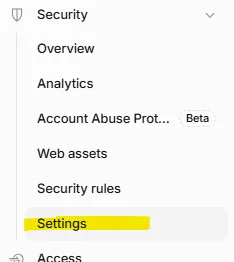
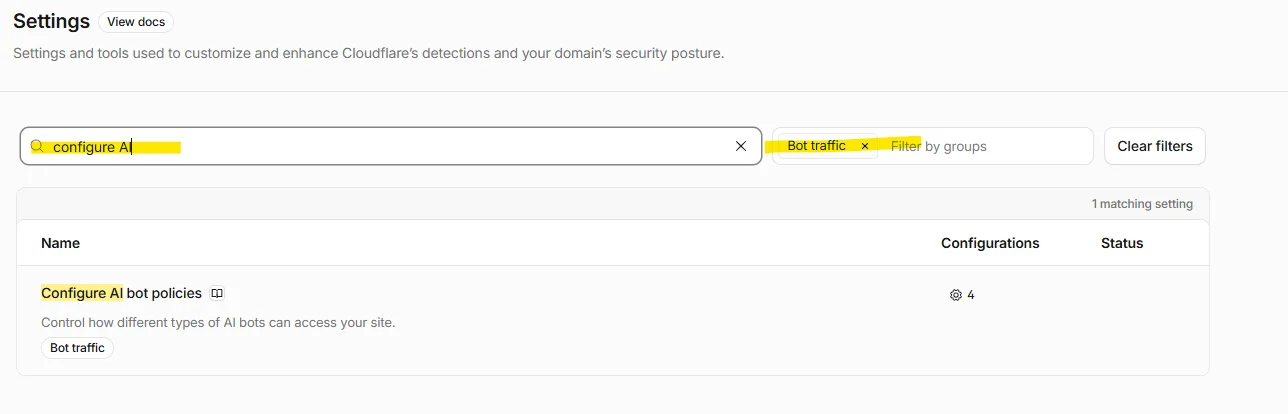
- In the settings search box, type “configure AI” and filter by Bot traffic. Click the Configurations gear icon.
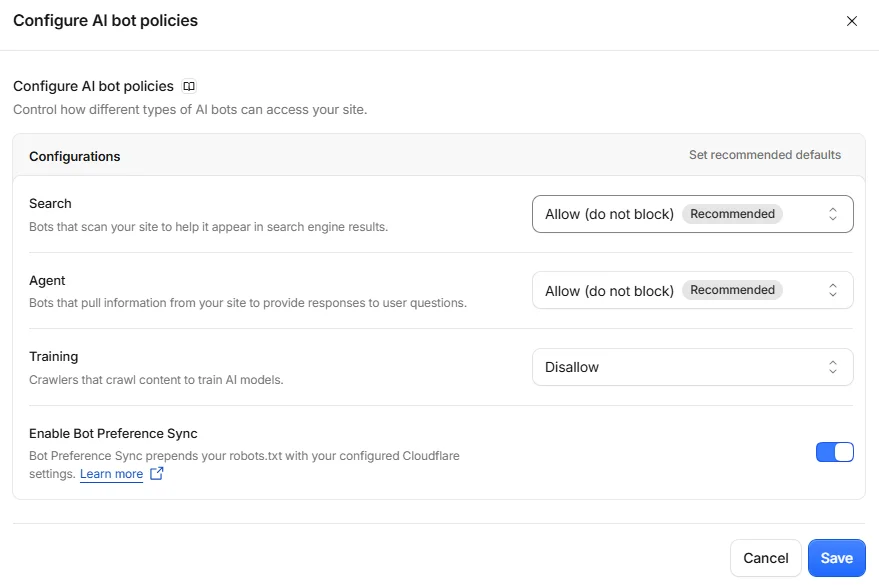
- Set Search and Agent to Allow (Cloudflare marks both as recommended), set Training to Disallow, turn on Bot Preference Sync so your robots.txt matches, then Save.
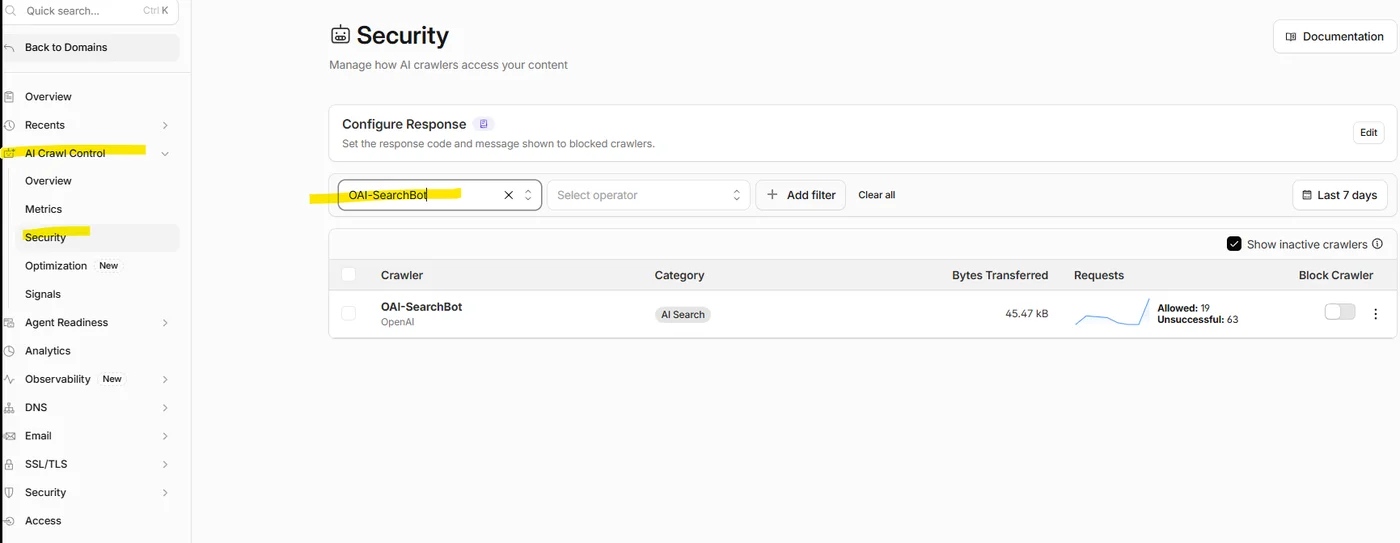
- To confirm ChatGPT can reach you, go to AI Crawl Control, then Security, and search for OAI-SearchBot. You’ll see how many of its requests were allowed and whether the crawler is blocked.
My takeThis is still a test. If your site isn’t on Cloudflare, nothing changes: ChatGPT finds your pages the usual way, through links, sitemaps and its own crawler, so just make sure your robots.txt doesn’t block OAI-SearchBot. If you are on Cloudflare, take two minutes to check the settings above.
6. Google’s CEO says AI agents will browse your site for people
What happened: Sundar Pichai said he sees Search being absorbed into an agentic layer, where AI agents reach websites by clicking through pages and through standard protocols (Search Engine Journal). Search Engine Journal also argued that being indexed now earns you a spot in an AI answer, not a guaranteed visit (Search Engine Journal).
What it means for you: This is a prediction, not a product launch. But it points the same way as the data: more answers happen without a click.
What to do: Make sure your key pages work and make sense with plain HTML, not only after heavy scripts load. Agents and crawlers read the same thing.
My takeI’m already doing this. I google much less now, on both mobile and desktop. I connect Claude to my browser and ask it questions about the page I’m on when I need clarification. I also built a workflow that creates this weekly digest, so I keep up with the industry faster than clicking through each newsletter email one by one.
7. Rank tracking dips, continued from last week
What happened: This is a follow-up to last week’s post. Rank tracker Nozzle found that 8% of the Google results pages it collected since Sept 13 looked normal but had most of the usual ranking sites swapped out, and on its worst days, Sept 27 to 29, about 25% of the results pages it checked were swapped (Search Engine Journal).
Last week Semrush confirmed it has also shown inaccurate Google ranking data (Search Engine Roundtable). Search Engine Journal asked rank tracking tools how they handle suspect results and whether they fix past data (Search Engine Journal).
What it means for you: Ranking drops in September and October reports may be tool problems, not real losses.
What to do: Before reacting to a ranking drop, check Google Search Console clicks and impressions for the same pages. If Search Console is steady, the drop is probably the tool.
My takeIf your tool has annotation capabilities, it should include a note by default. If not, it may also allow custom annotations. For a source of truth, Search Console is free and comes straight from Google.
8. Google treats some look-alike URLs as different pages
What happened: In a reply on Bluesky, Google’s John Mueller said Google treats URLs with raw brackets and percent-encoded brackets as separate URLs. He admitted he’d assumed they were the same and had probably given people the wrong answer in the past. He recommended using one form consistently in links, canonical tags and sitemaps (Search Engine Journal). The rule itself isn’t new: Google’s URL structure documentation already says reserved characters like brackets must be percent-encoded. Separately, Google updated that page Oct 23, but only to clarify hyphens vs underscores (Google Search Central).
What it means for you: Filter and search URLs on ecommerce sites often contain brackets. For example, /shoes?color[]=red and /shoes?color%5B%5D=red look like the same page to a shopper, but Google crawls them as two separate URLs. Brackets are how PHP sends several values for one filter, so they show up most on PHP sites with filtered product pages, like WordPress and WooCommerce filter plugins, Magento, or custom PHP builds. Mixing formats can create duplicate pages and waste crawling.
What to do: Start by checking how big the problem is. In Google Search Console, filter the Performance report by pages containing [ and then %5B to see which version gets impressions and clicks. In GA4, use the “Page path + query string” dimension to see how many visits land on each version. That tells you whether your canonical rule needs to be revised.
If it does, ask your developer to pick one bracket format for filter URLs and use it everywhere: in links, canonical tags, sitemaps and structured data. Mueller’s preference is the encoded version (%5B%5D), and he said existing sites using raw brackets are probably fine, but he wouldn’t build a new site that way. Use hyphens, not underscores, to separate words in URLs.
My takeNone of this is new. Brackets in filter URLs have been around for as long as PHP sites have had filters, and the standard saying to encode them is older than most of those sites. What’s new is Google’s own spokesperson realizing the two versions aren’t the same. If he had it wrong, it’s no surprise most sites have both. That’s why I see this as a governance issue, not a quick fix: it’s usually inherited from years of plugins, platform changes and different developers each building URLs their own way. It’s not as simple as “let’s choose one.” Your developer probably has to reinvent the entire wheel.